
How do you improve on awesome? Since its debut in 2012, the Razer Blade has been at the forefront of truly portable gaming laptops. And it's not hard to see why. The notebook is drop-dead gorgeous and light enough to tote around in a messenger bag. It can also play the most taxing games at the highest settings without breaking a sweat. Throw in the beautiful QHD+ display, and you've got a certified winner.
But Razer wanted to push the envelope further with this iteration, so it added its mesmerizing Chroma keyboard that opens up a myriad of customization options. It also bumped up the video memory, adding even more power to what was already a mini dynamo. The company also redesigned the cooling system and made the system a little lighter. And as if that weren't enough, Razer brought the price down to an attainable $1,999. The short battery life keeps the Blade from earning a perfect 5 out of 5 stars, but trust me: This laptop is in a class all its own.
Design:
Razer wisely chose to retain the sleek aesthetics of the Blade for yet another year. Five iterations in, I still find myself enthralled with the Blade's svelte sable design. The pair of lines running down the length of the CNC aluminum lid are noticeable enough to offer a bit of visual diversity without pulling your eyes away from Razer's glowing green tri-snake logo.
_678x452.jpg)
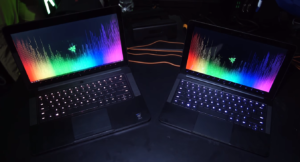
The laptop's interior offers more of that stunning inky-black aluminum. After a quick examination, you'll find a large touchpad below the island-style keyboard that is flanked by a pair of speakers and topped off by the circular power button, which is typical of the Blade design. However, Razer wasn't afraid to shake things up and added its gorgeous Chroma keyboard to the mix. The laptop's dark backdrop does a marvelous job of enhancing the flickering cornucopia of color, which pulses with an almost hypnotic effect.
Somehow, the Blade is lighter than previous iterations, weighing only 4.25 pounds while maintaining its slim 13.6 x 9.3 x 0.7-inch figure. Compare that to the Alienware 15, which weighs a hefty 6.6 pounds and measures a thick 15.2 x 10.6 x 1.34 inches. By contrast, the Aorus X3 Plus v3 is one of the few gaming laptops that can match the Blade in sheer sleekness, at 4 pounds and 12.9 x 10.3 x 0.9 inches.
Ports
The Blade's slim chassis doesn't have a lot of ports and jacks, but the ones that are there can support a solid gaming battle station. On the left, you'll find a pair of USB 3.0 ports and jacks for the headset and power cord.
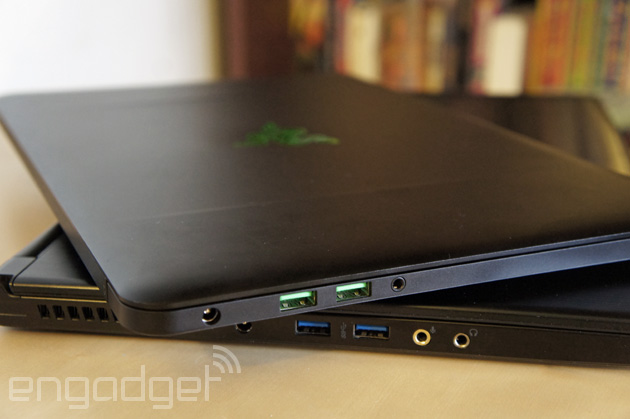
Along the right, there's another USB 3.0 port, a Kensington lock slot and a full-HDMI port. In anticipation of the company's new graphics amplifier, the Razer Core, the Blade houses a USB Type-C port. However, when you're not using the amp, you can use the port to hook up a 4K display.
Display
The Blade's 14-inch 3200 x 1800 touch-screen panel is vibrant and colorful, making it a great canvas for games and movies. When I watched a sample 4K video, I could make out every nick, ding and scratch on an antique train peeking through the black, glossy paint job. As the video transitioned to an underwater scene, I marveled at the delicate, seaweed-like fronds of the leafy sea dragons floating around. The creature's bright-yellow body popped against the aquamarine water.
The Witcher 3 looked resplendent on the Blade's glossy screen. Geralt's snow-white hair fell delicately over his broad shoulders, bringing attention to the myriad links in his chain-mail armor as well as the stitching in the dark-brown leather shoulder pads.
When we tested the panel's color reproduction capabilities, the screen showed 120 percent of the sRGB color gamut, topping the thin-and-light category's 83 percent average. The Plus v3 delivered 106.3 percent, while the Alienware 15 hit only 97.5 percent.
The display also produced accurate colors, scoring 0.95 (0 is ideal) on the Delta-E test. The Alienware 15 was less accurate, at 1.3, while the Plus v3 scored a much worse 10.7.
During our display brightness test, the Blade averaged 338 nits, surpassing the 253-nit category average. The Alienware 15 wasn't too far behind, with 311 nits, while the Plus v3 notched a dim 203 nits.
As much as I hated getting my fingerprints on the lovely display, I can testify that the touch screen is quick and responsive, allowing me to swipe through images as well as zoom in or out.
Audio
The Blade's audio could still use some work. The two top-mounted speakers were still very treble-heavy as I listened to Nicki Minaj's "Want Some More." The artist's acid-dipped lyrics filled my medium-size hotel room with minimal effort, but the speakers bottomed out while trying to accommodate the deep bass, creating a submerged-audio effect. This issue became even more apparent as I listened to Beyonce's "Formation" and discovered the bass line crowding the horns, causing the system to fail to deliver that hot sauce in my bag swag.
The speakers are at their best when you're gaming. The dialogue during Witcher 3 was crisp and precise. When it was time to fight some baddies, the horns swelled, filling my hotel room while the heavy clanging of swords rang in my ears.
Keyboard and Touchpad
I love looking at the Blade's new Chroma keyboard. As on its smaller brother, the Blade Stealth, each key on the island-style keyboard is capable of reproducing 16.8 million colors. Combine that with the six available lighting effects (Wave, Ripple, Breathing, Reactive, Spectrum Cycling and Static), and you can trick out the backlit keyboard into something truly unique.

All of the magic happens in the Chroma Configurator tab in Razer's Synapse software. There, you can create different lighting setups under different profiles. For example, you can have a custom setup for your video game and another for everyday use, similar to what you find on Alienware's Alien FX software.
As fun as admiring your mini light show may be, keyboards are meant for typing. Despite its rather low vertical travel (1.1 millimeters), the keyboard delivered just enough bounce, thanks to the 58 grams of force needed to depress the keys. I notched my typical 60 words per minute on the 10fastfingers.com typing test, with an error rate of only 1 percent.
The 4.1 x 2.5-inch Synaptics touchpad responded swiftly and accurately when I scrolled down web pages or highlighted passages of text in an article. Gestures such as pinch to zoom and two-finger rotate were equally precise. The pair of discrete mouse buttons had bouncy feedback as well as a satisfying click when pressed.
In addition to making your keyboard into an interactive work of art, Razer's Synapse software offers a bevy of features designed to help you play your best game. You can program macros that can be assigned to any key on the keyboard, and adjust the trackpad or fan speed. The software also gives gamers the ability to track their keystrokes and see a visual representation via a heat map.
Best of all, Synapse is a cloud-based program, which means those settings you spent time toiling over can be accessed on any device, so you can turn any of Razer's laptops into your own in a matter of seconds. The software also works with most of the company's ever-growing catalog of peripherals, such as the Razer Naga Epic Chroma mouse or the Razer BlackWidow Chroma keyboard.
Gaming and Graphics:
Razer came to kick some serious butt. Outfitted with an Nvidia GeForce 970M GPU, the system has 6GB of VRAM, which is double what the competition typically offers. That allowed this rather diminutive laptop to kick out a steady 57 frames per second at its native resolution (3200 x 1800) on Ultra as I hacked and slashed my way through The Witcher. The laptop kept up with my lightning-fast swordplay as I deftly lopped off an enemy's arm. The frame rate rose to 62 fps when I downgraded to high settings, and an even higher 71 fps on medium settings.

During the Tom Clancy's Rainbow Six Siege benchmark, the Blade obtained 63 fps on low at 1080p, sailing past the 57-fps average. When we ran the test on high, the Blade's score dropped to 44 fps, which was more than enough to top the 37-fps average for thin and light notebooks.
The Blade continued to hold court during the resource-taxing Metro: Last Light benchmark, obtaining 102 fps on low at 1080p, defeating the 68-fps average. The Plus v3, which also has an Nvidia GeForce 970M GPU with 6GB of VRAM, was hot on its trail, with 99 fps. The Alienware 15 (Nvidia GeForce 970M GPU with 3GB of VRAM) hit 66 fps.
When we switched over to high, the Blade scored a not-quite-playable 28 fps, which was just enough to top the 27-fps average. The Plus v3 and the Alienware 15 notched 29 fps and 27 fps, respectively.
But the real test came when we ran the benchmark at native resolution. The Blade produced 57 fps on low, matching the 57-fps average, though it failed to beat the Plus v3's 58 fps.
Performance:
The Blade is a monster on the productivity front, too. The system's 2.6-GHz Intel Core-i7-6700HQ processor with 16GB of DDR4 RAM allowed me to watch an episode of "Black Mirror" on Netflix while running a full system scan in the background with 10 additional tabs open in Google Chrome without the slightest bit of lag.
The notebook pulled down a smoking 13,268 on Geekbench 3, our synthetic performance test, dusting the 6,465 average for thin and light notebooks. The Plus v3 and its 2.5-GHz Intel Core i7-4710HQ CPU wasn't too far behind, with 12,863, while the Alienware 15's 2.9-GHz Intel Core i5-4210 CPU served up a disappointing 6,321.
The Blade's 256GB PCIe SSD duplicated 4.97GB of multimedia files in a speedy 14 seconds, which translates into a blistering 359.2 MBps. That all but decimated the 121.4-MBps average as well as the Alienware 15's (128GB M.2 SSD; 1TB, 5,400-rpm HDD) 103.9 MBps. Even the Plus v3 and its dual 256GB mSATA SSDs couldn't keep up, achieving only 299 MBps.
The Blade didn't let off the gas on the OpenOffice Spreadsheet Macro test, taking 3 minutes and 55 seconds to pair 20,000 names and addresses. That was more than enough to beat the 6:21 category average. The Alienware 15 managed 4:14, but the Plus v3 snatched a surprise victory, with a time of 3:52.
Battery Life
Razer claims the Blade will last up to 5 hours on a charge. However, the laptop clocked 5 hours and 42 minutes on our battery test (continuous web surfing over Wi-Fi). That's far short of the 8-hour average for thin and light laptops but still longer than the Plus v3, which tapped out at 5:38. The Alienware 15 lasted a more impressive 6:12.
Software and Warranty
Aside from the versatile Synapse software, the Blade comes with several gamer-centric programs. Gamers looking to chat with friends or bark orders during a match can use Razer Comms, the company's VoIP chat service.
Razer also bundles Nvidia's GeForce Experience, which includes additional player-friendly software, such as ShadowPlay recording software. Game Optimization automatically tweaks in-game settings to get the best performance and frame rates.
The Razer Blade comes with a one-year limited warranty.
Configurations
I had the pleasure of reviewing the $1,999 iteration of the Blade, which features a 2.6-GHz Intel Core-i7-6700HQ processor, 16GB of RAM, a 256GB PCIe SSD, an Nvidia GeForce 970M GPU with 6GB of VRAM and an integrated Intel HD Graphics 530 GPU. The $2,199 version is nearly identical to the base model, but bumps the storage from 256GB to 512GB.
Bottom Line
Pound-for-barely-there-pound, the Razer Blade is the best portable gaming laptop out there. For $1,999, gamers get a laptop that performs as if it were a 17-inch laptop. Thanks to its Core i7 processor and Nvidia graphics with 6GB of RAM, the Blade is a beast, whether it's shredding through enemies or spreadsheets. And if you happen to get tired of gazing into that lovely QHD+ display, you can stare at the beautiful Chroma keyboard, before you stow its slim chassis in a large purse or backpack.
If you want to save a few bucks, you should check out the $1,500 Alienware 15. But keep in mind that you'll be missing out on the Blade's lightweight design as well as its blistering speed. Overall, the Razer Blade is the perfect choice for gamers searching for a portable laptop that's equal parts showpiece and gaming behemoth.
