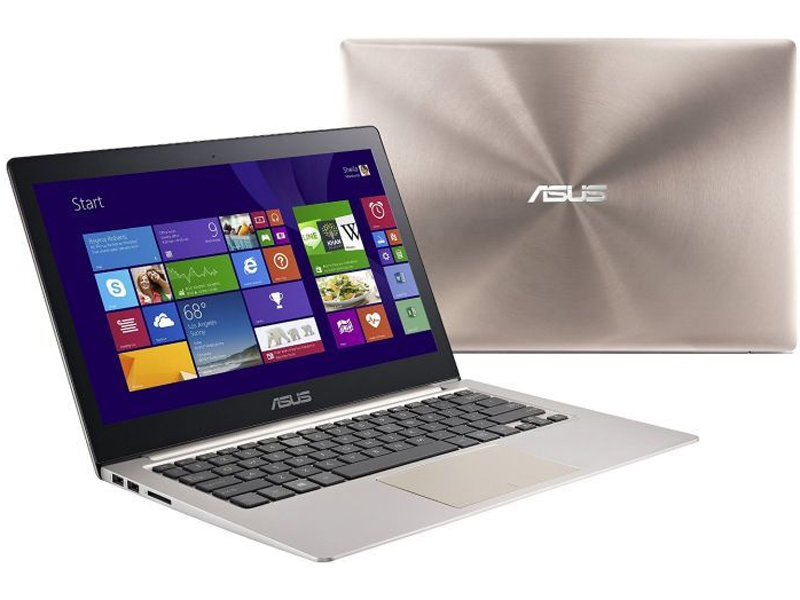
With the ASUS Zenbook UX303LN, you get an Ultrabook with oomph. It’s designed with the intention of providing better graphics than usual, thanks to the inclusion of a discrete NVIDIA GeForce 840M adapter, and it will at least give you an opportunity to run some games while still swinging a convenient thin-and-light form factor.
Build quality and design
The aluminium body and overall shape of the 13.3in UX303LN are reminiscent of the Apple Macbook Air, and people will continually go out of their way to point this out to you (sorry for doing just that). Just nod your head and rest easy in the fact that you’ve got a great overall laptop that’s comfortable to use (for the most part), and which will perform well for everyday tasks, including a bit of gaming.
An Intel Core i5-4210U, fourth-generation CPU is the leader in the engine room, and it’s supported by 8GB of RAM, a 128GB solid state drive (SSD), and the previously mentioned NVIDIA GeForce 840M graphics. For a machine that includes a discrete graphics adapter, it sure doesn’t feel like it. The Ultrabook disturbed our digital scales at 1.55kg and its balance felt good overall. You can open the lid with one hand and the base won’t lift up off the desk.
It has a thickness of 21mm at its thickest point when you include the rubber feet on the base, and the aluminium body provides plenty of rigidity. Indeed, the build quality is solid overall, though we did notice that the screen sometimes tilted a little when we picked up the laptop by the base to move it around. As such, we think the hinges could stand to be a little stiffer.
It has a thickness of 21mm at its thickest point when you include the rubber feet on the base, and the aluminium body provides plenty of rigidity. Indeed, the build quality is solid overall, though we did notice that the screen sometimes tilted a little when we picked up the laptop by the base to move it around. As such, we think the hinges could stand to be a little stiffer.

The screen is Full HD and supports touch, though we found that we rarely used the touch capability. It’s not like you can tilt the screen back all the way flat or switch into a tablet form factor; the most you can do is incorporate touch actions into your navigation of the Windows 8.1 environment. Because it’s a glossy screen, reflections from room lights will sometimes litter the screen, but it won’t give off a full mirror finish, thanks mainly to its decent level of brightness.
We found the overall quality of the screen to be easy on the eyes, and even using full brightness at night didn’t produce strain. For a 13.3in screen, we feel that the Full HD resolution is ideal. Some laptops, including Lenovo's Yoga 3 Pro have an 1800p resolution that can be tough for some eyes to use without scaling, and scaling in Windows 8.1 doesn't work as well as it should, with many system windows, dialogue boxes, and tooltips either looking muddy or staying at the native size of the screen.
Performance
As for its performance, the Zenbook’s Core i5 CPU, plentiful RAM, and SSD all combine to produce a laptop that won’t feel sluggish when undertaking everyday office and Web-based tasks, and it’s fine for image editing, video streaming, and also a bit of gaming. Blender 3D rendering recorded a time of 48sec, which is a solid result, while in CrystalDiskMark the SSD recorded a sequential read rate of 513 megabytes per second (MBps), and a write rate of 289MBps.
The laptop will auto-detect the appropriate graphics adapter to use for the application (either the integrated Intel HD, or the NVIDIA GeForce), although you can also select the adapter you want for particular applications. The Intel graphics are the default operator, so the laptop won’t draw too much power while running basic tasks on battery.
In our rundown test, in which we disable power management, enable Wi-Fi, maximise screen brightness, and loop a Full HD, MP4 video file, the laptop lasted 6hr 3min, which is a respectable time for a 13.3in Ultrabook in this test.

We did a little bit of gaming on this laptop just to give you an idea of what to expect. Battlefield 3 ran at only 11 frames per second at the native resolution of the screen using the NVIDIA adapter, and even dropping the resolution to 1366x768 only upped the frame rate to 22fps. You won’t want to use this laptop for this type of game unless you don’t mind getting killed all the time (though the way we play, the laptop has nothing to do with that).
When we ran Need For Speed: The Run, the results were more pleasing, with 27fps achievable at Full HD using the NVIDIA adapter. This game was enjoyable on the laptop, and for lazy scenarios, such as when you just want to lie down and race while resting the laptop on your chest, it’s perfectly fine. Using the Intel adapter, only 11fps were achieved, so the NVIDIA adapter definitely provided a good use case for running this type of game.
In 3DMark’s Fire Strike test, the NVIDIA adapter propelled the system to a mark of 1305, while the Intel graphics got 596. In Sky Diver, the NVIDIA adapter got 4965, while the Intel adapter got 2617. You can see that in these tough tests the discrete graphics do make a difference.