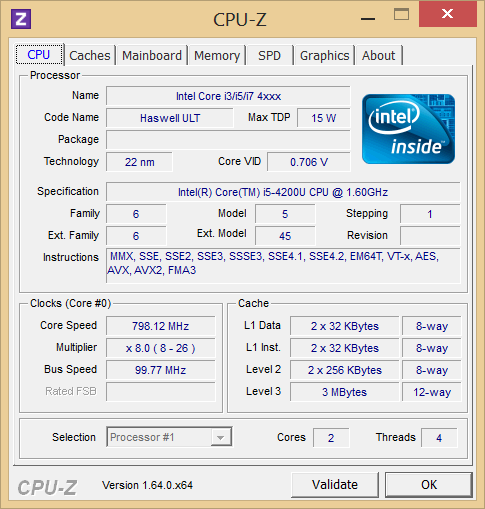
The Acer Aspire V7 models are available with a range of CPUs, starting with the least-expensive Ivy Bridge-based 1.8 GHz – 2.7 GHz
Intel Core i5-3337U and topping off with the Haswell-based 1.8GHz – 3.0GHz
Core i7-4500U CPU. Our review unit came configured with an
Intel Core i5-4200U CPU, which is also a
Haswell-based chip built with 22 nm manufacturing technology. It features a
base clock rate of 1.6 GHz and, with the help of
Turbo Boost, can increase to
2.6 GHz when conditions warrant it. All of the CPUs available in the V7 line, including the i5-4200U in our unit, are ultra-low-voltage processors with a
TDP of 15 W. This is 2 W below the TDP of comparable Ivy Bridge predecessors.
In terms of system memory, our V7 review unit featured 8GB DDR3-1600 (PC3-12800) RAM. Of this total, 4 GB is soldered permanently to the system board, while the other 4 GB is a replaceable SODIMM. A grand total of 12 GB is possible if the 4 GB module is replaced with an 8 GB SODIMM.
As
compared to other notebooks with the same CPU, the Aspire V7-582P-6673
nearly always comes out on top. Our synthetic benchmarks place it up to 5% above the
Vaio Duo 13 SVD1321M2E and
Vaio Pro 11 SVP121M2EB.G4 in the Super Pi 32m and wPrime 1024m tests, and 3DMark 06 CPU reinforces those results. Meanwhile, Cinebench R11.5 widens the gap even further, with the Vaio Pro 11 falling 11% behind in the xCPU benchmark (in this same test, however, the Vaio Duo 13 scores nearly identically with the V7).
To check whether or not the Aspire V7 could churn out the same level of performance while operating unplugged, we conducted a second run of 3DMark 11 while running on battery power only. The resulting score of 995 suggests that there is no discernible difference in performance under either power state.
Finally, we ran DPC Latency Checker to evaluate the notebook’s propensity for handling real-time audio and video streaming. As shown in the screenshot, we experienced occasional spikes in latency (at seemingly random intervals between 45 and 60 seconds duration). Disabling wireless and other devices did not resolve the problems. Still, the spikes are so irregular that it is unlikely to manifest itself as a major problem in practice.
Processor
The performance of the
Intel Core i5-4200U is most comparable to that of the Ivy Bridge
Core i5-3317U; that’s in spite of the fact that the 4200U is clocked 100 MHz below the 3317U, and that it features a TDP of 2 W less. The two CPUs nevertheless post nearly-identical results across all benchmarks, which is an encouraging result if you happen to be more interested in battery life than CPU performance gains (which is probably true for most consumers). The bottom line is that the Core i5-4200U should provide
more than enough power to satisfy most users while managing power
more efficiently than equivalent Ivy Bridge CPUs.
System Performance
To measure overall system performance, we use PCMark. Since its performance is still bottlenecked by a conventional mechanical hard drive, the V7 can’t be expected to compete in these tests with other Ultrabooks that leverage solid-state storage devices only. However, like many other lower-cost Ultrabooks, in order to meet the requirements of Intel’s specification, it still includes a solid-state drive—but for caching rather than dedicated storage. The end result of this approach is quicker access to and loading of frequently-used data and applications.
We performed each of the system performance benchmarks three times to allow the caching mechanism to do its job before recording our scores. In PCMark 7, our score of 3841 is very good overall, breaching the top third of our database and accompanied by other machines that leverage similar technologies beyond the constraints of mechanical-only storage. The same goes for PCMark Vantage(6361), where the overall position falls to merely the upper half. The two Sony Vaio Ultrabooks (the Duo 13 and the Pro 11) that we referenced earlier come out far ahead in these benchmarks thanks to their wholly solid-state storage configurations. In other words, it’s important to remember that, while caching certainly helps, there is no equal to a purely solid-state approach.
Storage Devices
As we touched on above, the V7 leverages a hybrid storage approach that involves a standard mechanical drive supplemented by a solid-state cache drive. The mechanical drive we received in our review unit was a Seagate ST500LT012-9WS142 500 GB 5400 RPM hard drive; this drive was paired with a Kingston SMS151S324G 24 GB SSD (strangely, Acer reports its capacity at 20 GB instead). The Kingston SSD is used to cache frequently-accessed data so that it can be fetched more rapidly upon subsequent retrieval. This caching mechanism is totally transparent to the user.
As for other storage options, not much else is available on the V7 series. The SSD size and function remains the same across all models, whereas the mechanical drive ranges in capacity from 500 GB (such as in our review unit) up to 1 TB—all 5400 RPM models.
GPU Performance
Our Aspire V7 came equipped with the standard integrated GPU for Haswell-based ULV CPUs—namely,
Intel HD Graphics 4400. Paired with the
Core i5-4200U CPUin our unit, this GPU’s clock speed ranges from
200 to 1000 MHz, and it isn’t likely to handle any serious gaming—though hopefully it can at least best scores from equivalent Ivy Bridge-equipped predecessors.
Fortunately, this seems to be the case. The
3DMark 11 overall score of
964 is
a triumph for integrated ULV graphics (and even
standard voltage IGPs until now), standing alongside such respectable competition as the
AMD Radeon HD 7570M(avg: 932) and the
GeForce GT 540M (avg: 993). These scores are far beyond that of even the Intel HD Graphics 4000 standard-voltage GPU results (avg: 604), though they can’t hold a candle to the excellent scores managed by the
HD Graphics 5000 machines (avg: 1112).
Cinebench R11.5’s OpenGL benchmark offers an even more distilled view of the GPU performance, and here, the 4400
manages a shocking 19.68—a performance (until now) unheard of in ULV integrated graphics territory.
Our gaming benchmark results follow suit. While it would certainly be wiser to upgrade to one of the dedicated graphics models if you’re planning on any moderate to heavy gaming, it’s good to know that even the ULV integrated graphics of our review unit should be able to handle Low settings on most modern titles without too much trouble (and some games, such as the two we tested, on Medium).
As it compares to the competition, the
Sony Vaio Duo 13 (which, again, shares the same CPU and GPU) falls within a couple percentage points on nearly all relevant benchmarks, while the
Vaio Pro 11 is handily crushed, most likely due to some throttling we encountered while testing it. Overall, we’re impressed with the integrated GPU performance of the Aspire V7-582P-6673.
System Noise
When idle, the Aspire V7 is practically silent, maxing out at 30.9 dB(A) by our measurements. Meanwhile, even loadnoise levels are not terribly bothersome, with a medianrecorded value of 36.6 dB(A) and an overall maximum of45.9 dB(A). Even when the fan reaches this absolute highest RPM, it benefits from a tone that is not disturbing—more whoosh than whistle—and the fact that the vent is rear-mounted helps to direct the noise away from the user as well.
Temperature
In spite of its relative quietness, the V7 also manages reasonable temperatures, even when under load. The hottest part of the notebook was the underside of the base unit, and it still managed a thoroughly reasonable average temperature of 36 °C. The maximum recorded temperature (44.2 °C) was in the upper-left quadrant of the bottom of the notebook (upper-right while the notebook is sitting upright), and while that’s not comfortable while sitting on the lap, it’s hardly worth getting concerned about.
Considering the thin profile of the Aspire V7, we werepleasantly surprised to find that its four speakers (all located on the underside of the base unit) churned outmostly clear sound at uncommonly high volumes. Obviously one cannot expect accurate frequency response across the spectrum from such small drivers, but the overall tone of the sound was better than expected. The inclusion of Dolby-developed post-processing software provides additional granular control over application- and task-specific audio enhancements, which include not only a 10-channel graphic equalizer but also a Volume Leveler, Dialogue Enhancer, and Surround Virtualizer.
Battery Life
Perhaps the most interesting story of Intel’s new Haswell line of CPUs is the improvement in battery life that it brings to mobile systems. Such is the story with the Aspire V7, which manages not only performance which is certainly adequate for most users, but also what can only be considered excellent battery life. For our battery tests, we choose Battery Eater Pro coupled with a variety of configuration templates and scenarios. During all tests, all screen and device timeouts are disabled.
Our first battery test is used to estimate maximum battery life. For this test, we set the notebook to the Power Saver power profile, lower brightness to minimum, disable all wireless radios, and launch the Battery Eater Reader’s Test. Here, our Aspire V7 test unit managed 12 hours and 20 minutes of runtime before shutting down.
Next, we shift to the opposite end of the spectrum with an attempt to measure minimum battery life. Here, we configure the notebook to the High Performance power profile, set brightness to maximum, reenable all wireless radios, and perform the Battery Eater Classic Test. Under these conditions, the notebook managed 2 hours and 4 minutes of runtime.
Finally, for a much more realistic approximation of the notebook’s longevity under normal usage conditions, we configure the power profile to Balanced, set brightness to as close to 150 cd/m² as possible, and launch a preconfigured web surfing script developed here at Notebookcheck. The result here was 5 hours and 32 minutes, which is yet again very good.
On the surface, the Acer Aspire V7-582P-6673 adds up to a solid choice: it features great battery life, an excellent touchscreen, surprisingly strong performance, and a reasonably solid build, all for an respectable price point of $849. If nothing else, it’s evidence that the Haswell microarchitecture really was worth the wait: the sheer fact that a ULV-equipped Ultrabook can handle medium settings in some modern games is amazing enough.
However, it features a few glaring drawbacks that overshadow many of its strengths. For starters, it’s hard to look past its thoroughly mediocre display, which not only is heavily reflective in moderately-lit environments, but which fails to impress in just about every other category as well (contrast, color reproduction, and resolution included). Couple that with its relatively bulky form factor (for an Ultrabook) and you begin to wonder why another model wasn’t made available that fills these gaps.
Well, it was: the
Acer Aspire V7-582PG-6421, which (for $200 more) will score you a 1080p screen, dedicated graphics, and double the storage space—additions which help to justify the size premium. If you don’t mind the extra cash, this might be a better option—however, it’s unfortunate that some iterations of the notebook aren’t available with Haswell integrated graphics (for sake of power savings) coupled with the 1080p panel option.
Still, if your mind is made up on a 15.6-inch machine, you’re able to look past a subpar screen, and you can live with the keyboard, the Acer Aspire V7-582P-6673 is worth considering.